
From Outdated to Outstanding: How We Modernized a Law Firm's IT Systems
A local law firm was looking to modernize its aging IT infrastructure. The firm's aging servers were no longer providing fast and reliable access to its files and applications.
They faced several challenges that are common with aging IT systems: slow performance, frequent downtimes, high maintenance costs, and the inability to support modern software applications.
Their old servers struggled to handle the increasing workload, resulting in delayed project timelines and frustrated employees. Security vulnerabilities were a growing concern, with outdated systems being more susceptible to breaches and data loss. For a firm holding client files, that risk carries professional weight, not just technical inconvenience.
Additionally, the physical server room was cluttered, noisy, and consumed too much energy, adding to inefficiencies.
They wanted a consolidated solution that would support their growing team and allow them to work from anywhere. Here's what we did.

Our Solution
We migrated their core servers, covering file, accounting, and case management, to our high-performance solid-state server platform: the ALT Small Business Server. We build and manage these platforms ourselves, so the firm gets one accountable team for hardware, migration, and ongoing support.
This upgrade provided near-instant file and application access, the ability to host additional applications, and significantly lower monthly server maintenance costs.
To modernize their file-sharing solution, we added cloud capability so that they could access their privately hosted files from anywhere. Files stay on infrastructure the firm controls, which is the arrangement many firms prefer for client data.
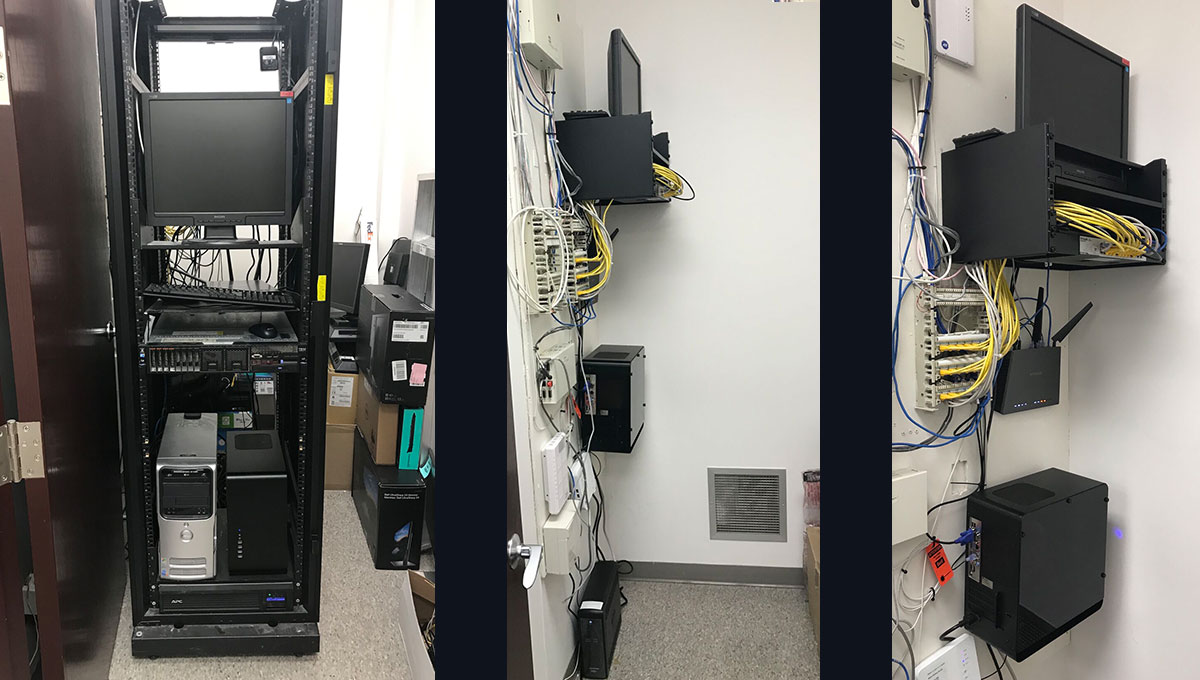
A Smaller, Quieter Server Room
We freed up physical storage room space by mounting the equipment to the wall and removing the server rack. Consolidating to our solid-state single server platform lowered energy consumption.
Best of all, the server room was now completely silent.
The Result
The client was very happy with the result. They were able to keep using the applications they were familiar with while enjoying all the benefits of modernization on a high-performance server platform with a small footprint.
Running on aging servers? Find out what a modernization path looks like.
Talk to an IT consultantFAQs: Server Modernization for Law Firms
When should a law firm replace its servers?
The usual signals are slow file and application access, frequent downtime, rising maintenance costs, and software that can no longer be updated. Aging servers are also a security concern: outdated systems are more susceptible to breaches and data loss, which matters more for a firm holding client data.
Should a law firm move to the cloud or keep servers on premises?
It depends on the firm's applications and how the team works. Many firms do best with a hybrid approach: a modern local server for the applications that need it, with cloud capability layered on so files are privately hosted but reachable from anywhere. The right split follows from the software you actually run.
Can we keep our existing legal software after a server upgrade?
Usually, yes. Modernization does not have to mean abandoning your software stack. In this project the firm kept its file, accounting, and case management applications and simply ran them on a faster, quieter, more reliable platform.
What are the benefits of a solid-state server platform?
Near-instant file and application access, lower energy consumption, a smaller physical footprint, and silent operation. Consolidating multiple aging machines onto one modern platform also reduces monthly maintenance costs.
How disruptive is a server migration for a working law firm?
With planning, minimally. Migrations are staged and the cutover is scheduled around the firm's working hours, so attorneys keep working against the old system until the new one is ready. Backups are verified before and after the move.
Takeaway
Server modernization doesn't have to mean abandoning your existing software stack. With the right approach, you can dramatically improve performance and reliability while keeping the tools your team already knows.
If your firm is running on aging infrastructure, a technology audit is the natural first step: it maps what you have and what a modernization path looks like. Resilient backups are part of the same conversation through business continuity planning, and ongoing management is covered under ALT Care Plus.

Written by Alex Nedel, CEO of ALT Consulting. He helps law firms build reliable technology foundations, from the servers behind their case files to the security standards insurers and clients expect.
Discover more

The difference between a law firm loving or hating its technology came down to this purchase decision

How a law firm saved 20% on IT software costs monthly by reducing software bloat

Transform your boardroom into a seamless hybrid conference space in just one week

IT Support for Law Firms: What It Covers and How to Compare

How to Choose the Right Clio Certified Consultant for Your Law Firm